MMC cannot open the file C:\Windows\system32\taskschd.msc
Well, that stinks...I just had it open yesterday.
This is a known bug in certain versions of Windows 2008 or 2008 R2
To Fix:
Open Explorer and go to directory:
C:\Users\USERNAME\AppData\Roaming\Microsoft\MMC\
and delete the taskschd file, (it has no file extension).
Or if you are Nervous Nellie, just rename it.
run taskscd.msc again and voila! It opens.
Showing posts with label Technically Speaking. Show all posts
Showing posts with label Technically Speaking. Show all posts
Thursday, September 24, 2015

Wednesday, June 25, 2014
MCSE and MCSD SharePoint Certifications
"Yes, there are 2 paths you can go by, but in the
long run, there's still time to change the road you're on."
- Robert Plant
Recertification exam every three years.
Step
|
Title
|
Optional training
|
Required exam
|
1
|
Installing and
Configuring Windows Server 2012
|
||
2
|
Administering
Windows Server 2012
|
||
3
|
Configuring
Advanced Windows Server 2012 Services
NOTE : After successfully completing steps 1-3, you'll earn a Microsoft Certified Solutions Associate (MCSA): Windows Server 2012 certification. |
||
4
|
Core Solutions
of Microsoft SharePoint Server 2013
|
||
5
|
Advanced
Solutions of Microsoft SharePoint Server 2013
|
Recertification exam every two years.
Step
|
Title
|
Optional training
|
Required exam
|
|
1
|
Programming in
HTML5 with JavaScript and CSS3
|
|||
2
|
Developing
ASP.NET MVC 4 Web Applications
|
|||
3
|
Developing
Microsoft SharePoint Server 2013 Core Solutions
|
|||
4
|
Developing
Microsoft SharePoint Server 2013 Advanced Solutions
|
Also, there is
this MCSD cert for SharePoint Apps.
Recertification exam every two years.
Step
|
Title
|
Optional training
|
Required exam
|
|
1
|
Programming in
HTML5 with JavaScript and CSS3
|
|||
2
|
Developing
ASP.NET MVC 4 Web Applications
|
|||
3
|
Developing
Microsoft Azure and Web Services
|
GOOD LUCK
Wednesday, March 26, 2014
Microsoft Social Listening MSL for Dynamics
I want to share a new product that MSFT is planning to roll out to GA Q2 or Q3 2014.
This new product comes about as a result of a few important acquisitions for Microsoft.
First, Parature, a leading cloud based customer self-service portal is exactly something Dynamics CRM has been in need of providing.
Second and third are 2 social engineering start ups NetBreeze and InsideView.
These screens are very new, so expect them to change!
Microsoft Social Listening is a way to provide users with BI Analytics of social activity and tie it to a CRM record. Wow. Twitter Analytics in Excel was just a bit of what MSL can provide from a BI perspective. But the sheer volume was exhausting even for PowerBI for the end user. My PowerBI Twitter Analytics data refreshes were taking 10 minutes. MSFT has invested heavily in the Twitter firehoses, something the start ups could not afford, so these posts are 'near' real time.
Shout out to Girish Raja for his teams efforts and the slides from SPC 284
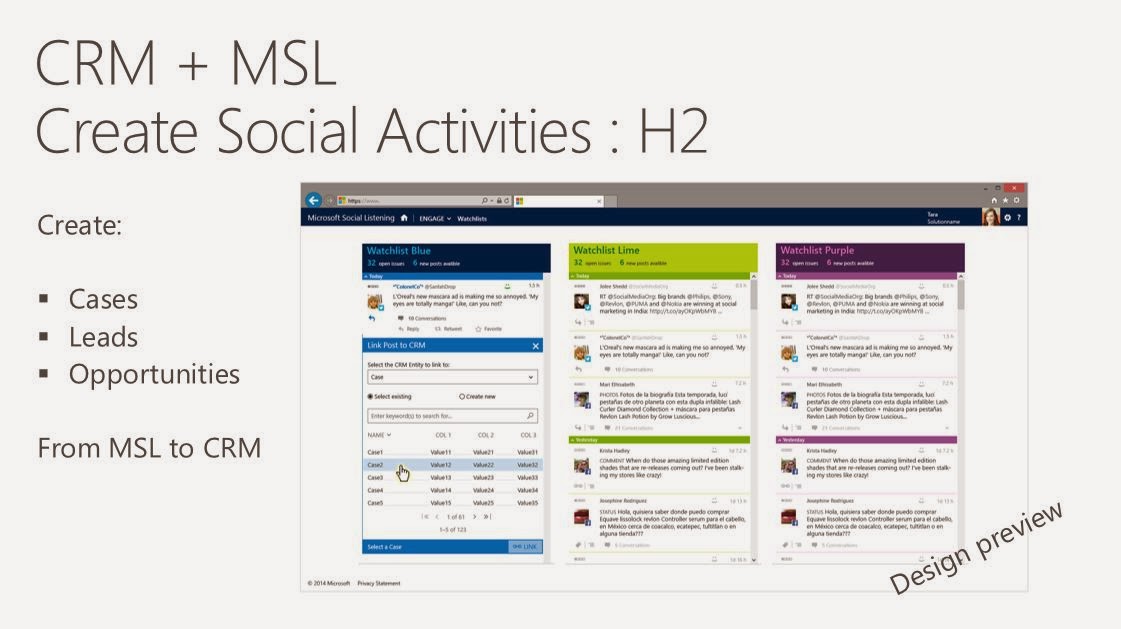
The last screen is where you map the post to a CRM record.


This new product comes about as a result of a few important acquisitions for Microsoft.
First, Parature, a leading cloud based customer self-service portal is exactly something Dynamics CRM has been in need of providing.
Second and third are 2 social engineering start ups NetBreeze and InsideView.
These screens are very new, so expect them to change!
Microsoft Social Listening is a way to provide users with BI Analytics of social activity and tie it to a CRM record. Wow. Twitter Analytics in Excel was just a bit of what MSL can provide from a BI perspective. But the sheer volume was exhausting even for PowerBI for the end user. My PowerBI Twitter Analytics data refreshes were taking 10 minutes. MSFT has invested heavily in the Twitter firehoses, something the start ups could not afford, so these posts are 'near' real time.
Shout out to Girish Raja for his teams efforts and the slides from SPC 284
The last screen is where you map the post to a CRM record.
Wednesday, March 12, 2014
SharePoint 3rd party Product Announcements made at the 2014 SharePoint Conference
A flurry of new product announcements were made at SPC14. Here are a few of the big players...
ShareGate
I spoke with owner Benjamin Niaulin while on the bus to the Las Vegas Speedway where he suggested downloading all available tools now and letting them auto update. They are a SCRUM team, so they release patches biweekly.
The biggest request from his no-brainier migration tool was to truly make it no-brainier and make all features available in PowerShell. This gives you the ability to schedule a migration task. The announcement the next morning came via email that they released PowerShell utilities and I was ecstatic that our customer who use Layer2.de with it's horrible support can now use ShareGate, which costs less and who's Help and Buttons are not written in German!
- PowerShell Commands
- Scheduling made possible through PowerShell
- Choice Column values copied even if a choice is no longer available
- Export to Excel let’s you Merge documents, rename them or move them
Harmon.ie
launches first enterprise collaboration hub. The product has come a long way, but not long enough in my mind.
Yaccov Cohen created a first ever SharePoint Top Influencers list. Dignitaries include Marc Anderson, Jeremy Thake, Scot Hilier…but they didn't include the Bottom Influencers list, who could include Chris McNulty, Mike Gilronan and myself.
Bamboo Solutions
The latest version of Bamboo Solutions’ process automation solution is now available for SharePoint 2013. Bamboo Workflow Conductor 3.5 allows users to create, manage and reuse custom business processes without having to do custom coding.
K2
announces K2 Appit release, delivering no-code workflow apps for Microsoft SharePoint Server 2013 and Microsoft SharePoint Online, in the cloud.
KnowledgeLake
expands Office 365 capabilities for SharePoint ECM suite of products
KnowledgeLake has announced it is bringing the power and functionality of KnowledgeLake Imaging to Office.
Metalogix
Metalogix announced a complete solution to move e-mail, files and SharePoint content to Microsoft Office 365. Metalogix has expanded its suite of content and collaboration tools with the announcement of Email Migrator 3.0 and Content Matrix 7.0, which work together, or independently to expedite the migration of email, files and SharePoint into Office 365 and better enable an organization’s.
Qbase
Qbase LLC, a leading provider of information technology and business intelligence solutions, today announced the launch of MetaCarta for SharePoint 2013, a plug-in enrichment service that geo-enables both structured and unstructured content inside the SharePoint 2013 environment
Tuesday, March 11, 2014
SharePoint Conference 2014 Recap

This was my second SPC and I was able to pace myself enough to keep much better notes up until the last day. Last year I had burned out early, as there is only so many sessions one can attend in a week, my mind was numb. I attended a variety of sessions including Executive, ITPro, Developer and Business User. I think this was the reason why my last SPC was so difficult for me by the final day, as I had attended pure ITPro and Developer sessions and took 2 tests, whew! Exhausting.
Keynote
The Keynote was delivered by President Bill Clinton who encouraged us to "do good" while making advancements with our technology. He impressed us with examples of how technology assisted The Clinton Foundation's efforts in (among a few) post earthquake Haiti to align the country's only mobile provider with the Dutch bank so that people can have access to banking and their money.
Basically, make the world a better place with technology.
(See 'Matrix Reloaded' and 'IronMan' and 'Hitchhikers Guide to the Galaxy' movies for shining examples of how Technology can Do Good)
User Voice
There were many product announcements made, which I will blog separately. The single most impressive take away for me was the incredible openness and reaching out that the MSFT Office and SharePoint teams expressed with the attendees. It was very refreshing. My Tweets were answered and favorited by those teams many times. In fact, When Sonya Koptyev announced the UserVoice site at the InfoPath Roadmap session we were blown away that they had launched an entire site dedicated to our user feedback.
Office Social Graph and Oslo
The next BigThing was the OpenGraph and Oslo. This blew my mind because of the nature of an app fabric that connects content with Users, AD and Yammer activity feeds. The code name Oslo is the display method for the Announcements on steroids style view that is so exciting, blogs are sprouting up about it like mad daily.
Connecting Content through People
Oslo is a search technology mostly, and it inspires us to search for people instead of document names or metadata. Content is trending around people, or me. People present content to me. I search for these trends and OfficeGraph filters and bubbles content that I want to see through Oslo display templates.


Friday, January 17, 2014
How to remove animations in Win2012
I sometimes notice, especially during Remote Desktop sessions, that the Windows 2012 animations annoy me due to their slow rendering.
To disable them, this
needs to be applied in order to remove the slow animations.
Note that this applies to the current user account only.
Control Panel > System > Advanced > Advanced > Visual Effects

Wednesday, November 20, 2013
Office Repair for Lync 2013 popping up
I have Office 2013 installed on my Win7 Enterprise laptop, but along the way I failed to properly uninstall OneNote 2010 and some other components of Office 2007, like the Calendar Print Assistant.
The other day I decided to clean the GAC as it were, and Remove those 2010 and 2007 vestiges.
Since then, Lync 2013 keeps randomly popping up on top of other programs.
I needed to Use Office Repair feature to resolve and reboot.
Go To Add/Remove (start>run>appwiz.cpl)
Repair Office 2013.
Reboot.
No more pop ups.
The other day I decided to clean the GAC as it were, and Remove those 2010 and 2007 vestiges.
Since then, Lync 2013 keeps randomly popping up on top of other programs.
I needed to Use Office Repair feature to resolve and reboot.
Go To Add/Remove (start>run>appwiz.cpl)
Repair Office 2013.
Reboot.
No more pop ups.
Monday, November 18, 2013
IE11 Anime video and the IE8 End Of Life
This just in from MSFT and the O365 team...
Office 365 will no longer support Internet Explorer 8 after 8 April 2014. For the best, richest experience with Office 365, we strongly recommend that you upgrade to the latest version of Internet Explorer. Internet Explorer 10 is available now, and Internet Explorer 11 is coming soon. Modern versions of Internet Explorer offer faster web browsing, integrated spell-checking, improved security, and more.
Internet Explorer 8 users will not be blocked from connecting to Office 365 after 8 April 2014; however, Internet Explorer 8 users should expect slower performance with Office 365’s Outlook Web App and other Office Web Apps.
For the best, richest experience with Office 365, we strongly recommend that you upgrade to the latest version of Internet Explorer. Internet Explorer 10 is available now, and Internet Explorer 11 is coming soon. Modern versions of Internet Explorer offer faster web browsing, integrated spell-checking, improved security, and more.
Internet Explorer 8 users will not be blocked from connecting to Office 365 after 8 April 2014; however, Internet Explorer 8 users should expect slower performance with Office 365’s Outlook Web App and other Office Web Apps.
If you experience a technical problem connecting to Office 365 from Internet Explorer 8 after 8 April 2014, Microsoft Customer Support and Service may need you to reproduce the problem on a supported browser.
Anime Festival Asia Special Video - feat. Inori Aizawa
Monday, November 11, 2013
SPSRI - Dynamics CRM and SharePoint integration
SPSRI - Dynamics CRM and SharePoint integration
 I was excited when my speaker submission came back as accepted for SPSRI, a first time that Rhode Island has hosted a SharePoint Saturday and a first time that I have been accepted to speak.
I immediately pondered; 'OK, so what topic should a newb present that has not already been presented at one of these events?'
I decided that since I have deployed countless Dynamics CRM + Sharepoint installations and have internally presented on the subject and written whitepapers on it. I would present this as a Best Practice and HowTo type of presentation.
As I said, this was my first time presenting at a SPS event so I concerned that there would be some Incognito hazing going on. But the speaker gods of the Northeast were kind, as well as Jason Himmelstein, Josh Cliff and Christopher McNulty, and I escaped their wrath.
Plus, having my colleague Mike Gilronan along was a tremendous help. Absolutely read his recap, as it was quite poignant.
Plus, having my colleague Mike Gilronan along was a tremendous help. Absolutely read his recap, as it was quite poignant.
SharePoint integrates very nicely with Dynamics CRM and solves collaboration issues that we have seen with the other Customer Relationship Management system, called SalesForce. Our SF users often complain that SF lacks versioning and findability on entity documents. This is where DynamicsCRM + SP excels.
As promised, here is the slide deck that I presented.
Friday, November 8, 2013
Using OMPM or How to bulk convert Pre OpenXML formats to docX or xlsX
We recently performed a migration to O365 for a
client with Office 2003. Their Office files were still in the old format, xls
without the ending X. This is a Pre OpenXML format and you cannot view these
files in Office WebApps. When the client uploaded them to SharePoint Online,
they are forced to download them to view them.
We needed to either individually open each of the 1000 Office documents and 'Save As xslx, docx, pptx' or we would have to find a way to bulk convert these.
Fortunately for us, we did not have to convert their 1000's of files individually, and used a tool from MSFT for this purpose called the Office File Converter (OFC.exe) which is available from the OMPM suite.
Here are the steps that we needed to do.
Download Office Migration Planning Manager (OMPM) to the machine that hosts the files.
From <http://www.microsoft.com/en-us/download/details.aspx?id=11454>
The installer extracts all tools and resource files by default to C:\OMPM
If your machine does not have Office 2003 installed, which by now it probably does not, then you will also need to install the Office compatibility pack to convert the files.
http://support.microsoft.com/kb/923505
Once that is installed, open the C:\OMPM\Tools folder that contains tools the Office File Converter (OFC) and Version Extraction Tool (VET)
Following this guide for more information:
Using OMPM tools
Use the Office File Converter (OFC) to do bulk conversions of specific Office files that are in version 97 through 2003 file formats to the Office 2010 file formats.
http://technet.microsoft.com/en-us/library/cc179179(v=office.14).aspx
Using the tool is a bit tricky. You really need to look at the documentation in the ini file.
We needed to either individually open each of the 1000 Office documents and 'Save As xslx, docx, pptx' or we would have to find a way to bulk convert these.
Fortunately for us, we did not have to convert their 1000's of files individually, and used a tool from MSFT for this purpose called the Office File Converter (OFC.exe) which is available from the OMPM suite.
Here are the steps that we needed to do.
Download Office Migration Planning Manager (OMPM) to the machine that hosts the files.
From <http://www.microsoft.com/en-us/download/details.aspx?id=11454>
The installer extracts all tools and resource files by default to C:\OMPM
If your machine does not have Office 2003 installed, which by now it probably does not, then you will also need to install the Office compatibility pack to convert the files.
http://support.microsoft.com/kb/923505
Once that is installed, open the C:\OMPM\Tools folder that contains tools the Office File Converter (OFC) and Version Extraction Tool (VET)
Following this guide for more information:
Using OMPM tools
Use the Office File Converter (OFC) to do bulk conversions of specific Office files that are in version 97 through 2003 file formats to the Office 2010 file formats.
http://technet.microsoft.com/en-us/library/cc179179(v=office.14).aspx
Using the tool is a bit tricky. You really need to look at the documentation in the ini file.
One of the tricks was to ALSO include the FOLDER location
from that INI file
For the OFC.exe to work there
must be a [FoldersToConvert] entry in the OFC.INI
file.
Fldr=C:\OMPM\TOOLS\EXAMPLE
FOLDER\ (in this case I put all the files I wanted to convert into the
“EXAMPLE FOLDER”)
You can put
multiple folders under this folder,
OFC.exe will follow this path a
convert all DOC and XLS files into DOCX and XLSX files.
It will leave the old
DOC file in the folder and create the new DOCX file right
alongside.
The date created
field will NOT change for the new DOCX or XLSX files
All the new files
will be created in the appropriate folder, even if there are multiple layers of
folders under the original location
In this case, the
SourcePathTemplate and the DestinationPathTemplate listings in the OFC.INI file
are just:
SourcePathTemplate=*\*\*\*\
DestinationPathTemplate=*1\*2\*3\*4\
Monday, October 28, 2013
SharePoint Open PDF in Browser
Occasionally we get a user asking us why a PDF
prompts to be saved instead of opening when they click on it from a website in a
browser, any browser, not just IE or FF.
The answer is 50% because of an Adobe setting and 50% because of an Internet Explorer setting.
FireFox and Chrome do not have the browser issue, only IE requires the site name with the PDF be added to Trusted Sites.
The IE setting:
Add the site in question to the Trusted Sites list.
In IE, choose Tools > Internet Options and add the site to the Trusted Sites list.
Restart the browser.
The Adobe setting:
It is important that you have the latest Adobe software first off. Check the Taskbar icon to see if an Adobe update is pending. Often times an update to Adobe is already queued up and pending the user to just click the little A icon in the taskbar and continue the update.
Next is the critical piece of this "Open in browser" puzzle.
Open Adobe (either by "Start > All Programs > Adobe" or by just opening a PDF stored on the computer.
Then edit the preferences and assure the Checkbox is CHECKED for Display PDF in Browser:
From the Menu, click EDIT > Preferences

Then Check the box and close and close and reopen the browser.

Close the browser and reopen it.
Test, issue should be resolved.
The answer is 50% because of an Adobe setting and 50% because of an Internet Explorer setting.
FireFox and Chrome do not have the browser issue, only IE requires the site name with the PDF be added to Trusted Sites.
The IE setting:
Add the site in question to the Trusted Sites list.
In IE, choose Tools > Internet Options and add the site to the Trusted Sites list.
Restart the browser.
The Adobe setting:
It is important that you have the latest Adobe software first off. Check the Taskbar icon to see if an Adobe update is pending. Often times an update to Adobe is already queued up and pending the user to just click the little A icon in the taskbar and continue the update.
Next is the critical piece of this "Open in browser" puzzle.
Open Adobe (either by "Start > All Programs > Adobe" or by just opening a PDF stored on the computer.
Then edit the preferences and assure the Checkbox is CHECKED for Display PDF in Browser:
From the Menu, click EDIT > Preferences
Then Check the box and close and close and reopen the browser.

Close the browser and reopen it.
Test, issue should be resolved.
Wednesday, July 31, 2013
SharePoint 2013 dbghelp.dll issue
Issue:
SQL Event logging dbghelp.dll messages every second, or multiple msgs per second.
Solution:
Reduce the time they are logged.
The Database Performance Metric Timer Job runs every minute. This was throwing the message into SQL. This appears to be a bug with SharePoint 2013 on premise. The 'workaround' is to Change the frequency of the Timer Job to Daily, rather than the default of every minute.
I found this to be the most helpful post and provided the person that had incorrectly set the Answered post with an update to the lower most post marked as Helpful that actually resolved this.
http://social.technet.microsoft.com/Forums/sharepoint/en-US/6060757a-9832-4d28-8719-c24862ef7de9/sql-2012-standard-with-sharepoint-2013-error-message-filling-sql-log-using-dbghelpdll-version
By "reduced" I mean until midnight when the Timer job associated with the issue will run again.
SQL Event logging dbghelp.dll messages every second, or multiple msgs per second.
Solution:
Reduce the time they are logged.
The Database Performance Metric Timer Job runs every minute. This was throwing the message into SQL. This appears to be a bug with SharePoint 2013 on premise. The 'workaround' is to Change the frequency of the Timer Job to Daily, rather than the default of every minute.
I found this to be the most helpful post and provided the person that had incorrectly set the Answered post with an update to the lower most post marked as Helpful that actually resolved this.
http://social.technet.microsoft.com/Forums/sharepoint/en-US/6060757a-9832-4d28-8719-c24862ef7de9/sql-2012-standard-with-sharepoint-2013-error-message-filling-sql-log-using-dbghelpdll-version
By "reduced" I mean until midnight when the Timer job associated with the issue will run again.
Thursday, July 11, 2013
XSLT Problem with Windows KB2844286
If
you have any clients on the Automatic Tuesday Windows Update cycle, and they are
running SharePoint on premise, please be aware of a critical issue that occurred
at one of our clients as a result of the June 11th Updates that were
installed last night.
It will be very obvious, the WebPart Header will display OK, but all contents in the webpart disappear and will instead show an error
Error while executing web part: System.NullReferenceException: Object reference not set to an instance of an object. at System.Xml.Xsl.XslCompiledTransform.Load(MethodInfo executeMethod, Byte[] queryData, Type[] earlyBoundTypes) at Microsoft.Xslt.STransform.GetCompiledTransform() at Microsoft.SharePoint.WebPartPages.BaseXsltListWebPart.LoadXslCompiledTransform(WSSXmlUrlResolver someXmlResolver) at Microsoft.SharePoint.WebPartPages.DataFormWebPart.GetXslCompiledTransform() at Microsoft.SharePoint.WebPartPages.DataFormWebPart.PrepareAndPerformTransform(Boolean bDeferExecuteTransform) 5962a0e6-2114-4dad-9682-5b327c6e47e1
The Solution
Go To Control Panel, Programs> Programs and Features > View installed Updates
In the Windows section, find Windows KB2844286
Uninstall it. (And you may want to disable Automatic Updates)
open elevated Command Prompt and run IISRESET
It will be very obvious, the WebPart Header will display OK, but all contents in the webpart disappear and will instead show an error
Error while executing web part: System.NullReferenceException: Object reference not set to an instance of an object. at System.Xml.Xsl.XslCompiledTransform.Load(MethodInfo executeMethod, Byte[] queryData, Type[] earlyBoundTypes) at Microsoft.Xslt.STransform.GetCompiledTransform() at Microsoft.SharePoint.WebPartPages.BaseXsltListWebPart.LoadXslCompiledTransform(WSSXmlUrlResolver someXmlResolver) at Microsoft.SharePoint.WebPartPages.DataFormWebPart.GetXslCompiledTransform() at Microsoft.SharePoint.WebPartPages.DataFormWebPart.PrepareAndPerformTransform(Boolean bDeferExecuteTransform) 5962a0e6-2114-4dad-9682-5b327c6e47e1
The Solution
Go To Control Panel, Programs> Programs and Features > View installed Updates
In the Windows section, find Windows KB2844286
Uninstall it. (And you may want to disable Automatic Updates)
open elevated Command Prompt and run IISRESET
Monday, January 7, 2013
Lync Mobile Client setup
Lync Mobile Client setup
Download the Microsoft Lync 2010 for iPhone client from the App Store.
Or the Lync App in the Windows App Store
Tap the More Details link.
Tap the Sign In button.
Select You and tap Next.
Type your mobile phone number and tap Next.
Tap Done.
Download the Microsoft Lync 2010 for iPhone client from the App Store.
Or the Lync App in the Windows App Store
| Sign-In Address field | first.last@yourcompany.com |
| Password field | Your AD password |
| Username field | E0#####@yourcompany.rsm.net |
| AutoDetectServer | ON |
Tap the Sign In button.
Select You and tap Next.
Type your mobile phone number and tap Next.
Tap Done.
Friday, October 19, 2012
Using the Calendar Printing Assistant for Outlook
The Calendar
Printing Assistant for Outlook is a program that provides an easy way to print
and customize Outlook calendar information. It puts you in control of the tools
you need and helps you plan and create designer-quality output.
Download:
http://www.microsoft.com/en-us/download/details.aspx?id=16645
With this download you can:
In the below calendar, I have added my Exchange Calendar, My Tasks, Ron's shared Exchange calendar and my Office365 Calendar.

Download:
http://www.microsoft.com/en-us/download/details.aspx?id=16645
With this download you can:
- Add Shared Calendars and print them!
- Print dynamic calendar views
- Customize and personalize your calendars
- Adjust information to changing views
In the below calendar, I have added my Exchange Calendar, My Tasks, Ron's shared Exchange calendar and my Office365 Calendar.

Tuesday, October 2, 2012
Adobe Reader 10.1.4 Checkout and Open
Today I installed Adobe PDF Viewer version X (10.1.4) and when you open a
document in SharePoint you are Defaulted with Check Out & Open.
That seems to be a BAD implementation by Adobe, perhaps intentionally done?

That seems to be a BAD implementation by Adobe, perhaps intentionally done?

Tuesday, September 11, 2012
Does Taking a live VM Snapshot effect SharePoint availability or performance?
I was asked this question by a client recently...
Do you know if taking a server snapshot from a Vm will disrupt anything in production like a SharePoint Server user access?
The answer is the consulting 'drinking game' answer...It depends.
For one, if the server is being acquiesced when the snap shot is being taken. A
standalone VMware snapshot won’t acquiesce, but if a snapshot is being taken as
part of a backup program then all the database services on the server will be
paused and the DBs on that server will be inaccessible until all pending
transactions have been written and the snapshot has been committed; at [company name]I have one server where this takes almost 15 minutes.
Otherwise,
no... a snapshot will not impact SQL function unless the disk
with the virtual server is severely overtaxed – to that point where the guest VM
is probably unusable anyway.
Friday, July 20, 2012
Sh$# Steve Jobs Said...

An
intranet site needs to impute its values from the very first impression it
makes.
Starting
life with a world class feel and identity is essential.
Monday, July 2, 2012
NTLM Authentication in FireFox
AKA, the FireFox Fix.
This is required if you have a Windows Authenticated website and need to access it via FireFox and not have to re-authenticate.
Type
about:config in the FF address bar
|
Click the cute
"I'll be careful" button
|
In
the filter search type "ntlm"
And
select "network.automatic-ntlm-auth.trusted-uris"
|
Now enter the
domain.com address
If your site's
sharepoint address is scooby.sharepoint.com, just enter sharepoint.com in
here
|
Retry, you
should not be able to access the resource, but close and reopen FF first.
|
Friday, April 13, 2012
How To Capture HTTP traffic
To capture WinHTTP logs
- Open an elevated command prompt window on the client PC.
- Run the following command: netsh winhttp set tracing trace-file-prefix="C:\Temp\dpws" level=verbose format=ansi state=enabled max-trace-file-size=1073741824This command enables WinHTTP logging. All log files will be stored in the C:\Temp directory, and the filenames will begin with the dpws prefix. At most 1 GB of log files will be stored.
- If the process using WinHTTP on the client is already running, restart the computer. For example, if the Function Discovery APIs are being used, the computer must be restarted. The Function Discovery APIs call WinHTTP from inside a service host, which may have already started when tracing was enabled.
- Start the WSDAPI-based client application. The application being debugged or the WSD Debug Client can be used.
- Reproduce the application failure.
- Terminate the WSDAPI-based client application.
- If the process using WinHTTP is not terminated with the client application, restart the computer. For example, if the Function Discovery APIs are being used, the computer must be restarted.
- Run the following command: netsh winhttp set tracing state=disabledThis command disables WinHTTP logging.
- Inspect the DPWS logs in C:\Temp and verify that the required requests and messages were sent.
- If secure channel (HTTPS) communication is being used, check for SSL/TLS failures.
Subscribe to:
Posts (Atom)